
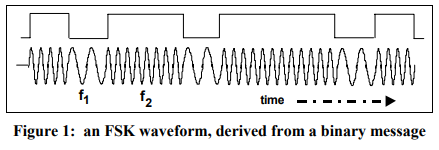
1. 什么是 2FSK(用两个频率表示 0 和 1)
2. 连接 CC1101 与 Arduino
参见 2ASK 无线传输.
3. 找出 CC1101 的频率偏移
参见 2ASK 无线传输.
4. 找出同步字
参见 2ASK 无线传输。下面的信号都带有
1010101010101010同步字。
5. 发送 2FSK 字节
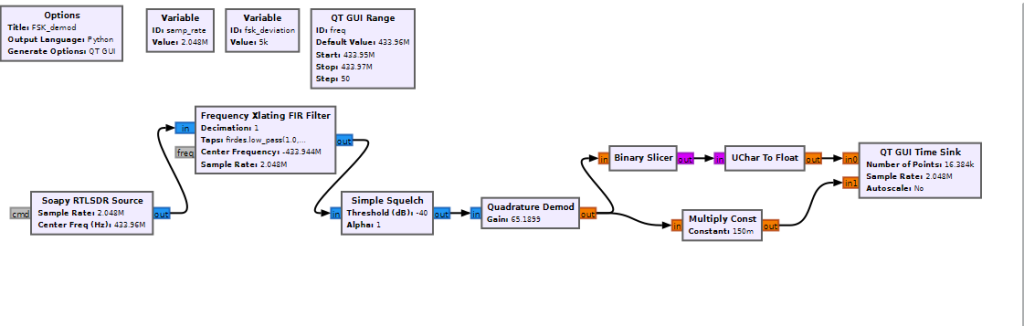
在 GNU Radio 中搭建 FSK 接收机 :
用下面的代码每 2 秒发送一次
0x01,0x02,0x04,0x08,0x10,0x20,0x40,0x80,并检查空中的 FSK 信号,结果保存为视频。最后一个脉冲逐位左移。红色信号由 Quadrature Demod 解调,它可以把 频率偏移映射为幅度。蓝色信号(二进制信号)由红色信号转换而来。
#include <ELECHOUSE_CC1101_SRC_DRV.h>

byte one_byte[8][1]={{0x01},{0x02},{0x04},{0x08},{0x10},{0x20},{0x40},{0x80}};
int i=0;

void setup() {
    Serial.begin(9600);
    if (ELECHOUSE_cc1101.getCC1101()){        // Check the CC1101 Spi connection.
    Serial.println("Connection OK");
    }else{
    Serial.println("Connection Error");
    }
    ELECHOUSE_cc1101.Init();              // must be set to initialize the cc1101!
    ELECHOUSE_cc1101.setCCMode(1);       // set config for internal transmission mode.
    ELECHOUSE_cc1101.setModulation(0);  // 0 = 2-FSK, 1 = GFSK, 2 = ASK/OOK, 3 = 4-FSK, 4 = MSK.
    //Frequency error: +0.04MHz
    ELECHOUSE_cc1101.setMHZ(433.92);   // The cc1101 can: 300-348 MHZ, 387-464MHZ and 779-928MHZ.
    ELECHOUSE_cc1101.setSyncMode(2);  // 0 = No preamble/sync. 1 = 16 sync word bits detected. 2 = 16/16 sync word bits detected. 3 = 30/32 sync word bits detected. 4 = No preamble/sync, carrier-sense above threshold. 5 = 15/16 + carrier-sense above threshold. 6 = 16/16 + carrier-sense above threshold. 7 = 30/32 + carrier-sense above threshold.
    ELECHOUSE_cc1101.setCrc(0);     // 1 = CRC calculation in TX and CRC check in RX enabled. 0 = CRC disabled for TX and RX.
    ELECHOUSE_cc1101.setDRate(9.6); //9.6kbps
    ELECHOUSE_cc1101.setDeviation(5);  //5k
    Serial.println("Tx Mode");
}

void loop() {

ELECHOUSE_cc1101.SendData(one_byte[i], 1, 100);
delay(2000);
i=(i+1)%8;

}